Showing posts with label multimedia. Show all posts

Monday, 27 June 2011

Masking

Today I want to share something very simple that is masking. In a flash we can create a masking objects. Here are ways

step

Create a document in a flash, kemuadian for the second screen, the first name as okjek / text and the second call as a mask.
  1. At the object layer enter text here know the image I entered the text "online portfolio 'see chart below.

Just click like button if you like

Sunday, 26 June 2011

Morping Object

object morping is something that turns into other objects as an example and the steps to creat object morping see below

1. create a rectangular object on the stage at the first frame
2. on the frame to 25 create a round object
Just click like button if you like

Motion Guide And Path

to create a motion guide you need an object and it should be separate from other okjek

Step

1.insert 2 layar of the background and the circle
2. in layer circle select ovol tool and make a circle on the stage
3. select the ball on screen guide see chart below


Just click like button if you like

Motion tween tutorial

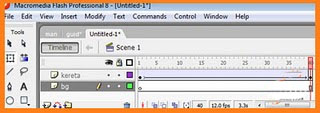
To create a simple motion tween animation it is very easy to learn how to see below: 


What is important is you need to make two layers below


  1. set the name of both the first layer of cars and the second screen background
  2. look at the timeline and select the first frame
  3. insert the object car (other objects can also be included)
  4. in the first frame to set the car on the left
  5. Click on frame 40 and insert key frame
  6. on frame 40 change the image on the right side of the car shown in the diagram below
Just click like button if you like

Introduction to flash

Introduction to flash or adobe flash 


macromedia Flash is software used to develop a complex animation and interactive web development. Flash easier to use because it uses drag and drop techniques.


stage 

Just click like button if you like

Monday, 23 May 2011

Flash Motion Grafik

Tutorial, how do you creat motion graphics,Very simple tutorial I want to share with you, how do you creat motion graphics in Flash. For those who already know just ignore. But for those who do not know follow the process.

  • The first step you go to flash 
  • then you take ovol tool and drag the mouse on the stage you make a circle.
  • then you go  frame no30, slightly longer if you want, you can add 50-70  do not mind depending on the requirements of fast or slow you want.
  • On the frame to the last 30, you put the cursor on the frame 30 and right click> insert keyframe
  • After that on the frame 30 above the circle you just put any  place
  • Now you go back the first frame and right click> create motion tween

    Done .... to play motion just press enter or press ctrl + enter

Good luck
Just click like button if you like

LinkWithin

Related Posts Plugin for WordPress, Blogger...